
Deposit DW88 Via E-Wallets, Bank Transfers And USDT
Deposit DW88 allows users to quickly add funds to their accounts to participate in games and use the platform’s features. Simply choose a suitable payment method, enter the amount you want to deposit, and review the information before confirming the transaction. DW88 supports deposits on both mobile devices and computers, offering the convenience of funding accounts whenever necessary.
Updated transaction limits on the system
The deposit DW88 system supports multiple payment methods, allowing users to choose based on their transaction needs. Each channel has its own limits, processing time, and requirements, making it easier to select a suitable method before making a deposit.
| Deposit method | Transaction channel | Limit (MYR) | Processing time |
| Fast Deposit | FPX | 50 – 30,000 | 1 minute |
| Fast Deposit | Touch ‘n Go eWallet | 30 – 30,000 | 1 minute |
| Fast Deposit | DuitNow QR | 30 – 30,000 | 1 minute |
| Bank Transfer | Online Banking (Affin Bank, etc.) | 30 – 50,000 | 5 minutes |
| Bank Transfer | ATM / CDM | 30 – 50,000 | 5 minutes |
| Crypto | USDT (ONEPAYCT – ERC20/TRC20) | 30 – 50,000 | Fast processing |
Deposit DW88 guide for beginners
Deposit DW88 is quite simple, as beginners only need to choose the correct payment method and enter the amount they want to deposit. Before confirming the transaction, check the details carefully to minimize errors and ensure the funds are transferred to the correct account.
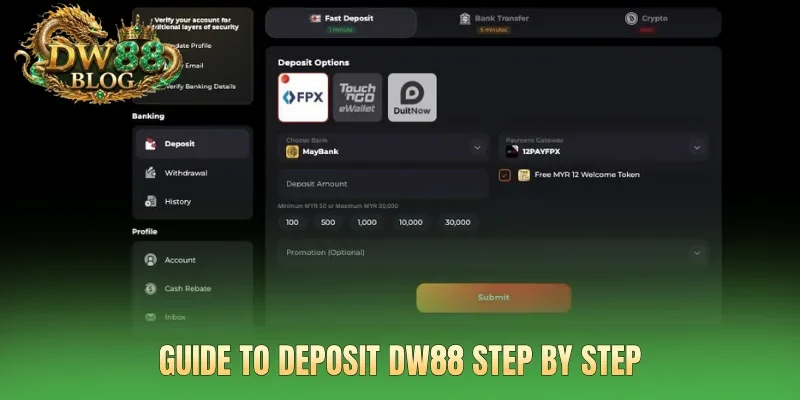
How to transfer funds via FPX / Touch ‘n Go / DuitNow
Deposit DW88 supports FPX, Touch ‘n Go, and DuitNow, allowing users to make online deposits through their preferred payment method. The process is straightforward: select the appropriate channel, enter the deposit amount, and complete the payment according to the instructions.
- Step 1: Log in to DW88, go to the Deposit section, and select FPX, Touch ‘n Go, or DuitNow QR.
- Step 2: Enter the amount you want to deposit, check the applicable transaction limit, and click Continue to proceed to the payment step.
- Step 3: For FPX, select your online bank; for Touch ‘n Go, open your eWallet to make the payment; for DuitNow, scan the displayed QR code.
- Step 4: Review the transaction details, confirm the payment, and wait for the system to update the balance after the transaction is completed.
Deposit DW88 via bank transfer
Users can deposit funds through a bank account using Online Banking or an ATM/CDM. Simply select the appropriate method, transfer the funds according to the displayed information, and upload the receipt to complete the transaction.
- Step 1: Log in to DW88, select Deposit, and choose the Bank Transfer method.
- Step 2: Select Online Banking or ATM/CDM, then enter the amount you want to deposit, from 30 – 50,000 MYR.
- Step 3: Make the transfer using the exact recipient account details displayed on DW88.
- Step 4: Upload the transaction receipt to the system and wait for processing, which is expected to take around 5 minutes.
USDT deposit process
USDT is one of the deposit DW88 options available on the ERC20 and TRC20 networks. Users should select the correct network, verify the wallet address and deposit amount, and review all details before confirming the transaction.
- Step 1: Log in, select Deposit, and choose the Crypto method with USDT.
- Step 2: Select the ERC20 or TRC20 network that matches the network being used by your wallet.
- Step 3: Enter the deposit amount, check the exchange rate, and verify the wallet address displayed by the system.
- Step 4: Transfer USDT to the correct wallet address, then check the transaction status and wait for the system to update the account balance.
See more: Withdraw DW88 Safely And Fast Via Bank, Touch’n Go
Important notes for deposit DW88
Before making a deposit, users should carefully check the payment method, amount, and transaction details displayed on DW88. Following each step correctly and keeping the receipt after completing a transfer can help minimize errors during the deposit process.
Verify the selected payment method
Before deposit DW88, users should carefully verify the selected payment method to avoid making the wrong transaction. For bank transfers, make sure the recipient account details are correct before confirming the payment. If depositing through FPX, Touch ‘n Go, or DuitNow, check that the corresponding payment channel has been selected correctly.
Enter the required amount and transaction information
The deposit amount must be within the limit displayed for each payment method. Users should review the amount, recipient information, and other transaction details carefully before confirming the payment. For bank transfers, keep the receipt after completing the transaction so it can be uploaded to the system if required.
Save the receipt after completing the deposit
After completing the transaction, keep the receipt or a screenshot of the payment for future reference if needed. The receipt should clearly show the amount, transaction time, and payment status. If the system requires a receipt upload, make sure to submit the receipt for the correct transaction to avoid confusion.
Tips for handling deposit DW88 errors
Some deposit DW88 errors may occur when a transaction has not been recorded, incorrect payment information has been entered, or the system is taking longer to process the transaction. In these situations, users should check the transaction status first before trying again to avoid creating duplicate transactions.
- Funds transferred but balance not updated: This may happen because the transaction is still being processed. Check the transaction status and verify the transfer amount and time, then wait for the system to update the balance or provide the receipt to support if the processing time has been exceeded.
- Transaction rejected or failed: This may be related to transaction limits, the selected payment method, or incorrect transaction information. Check each detail carefully, select the correct payment method, and try again only after confirming that the previous transaction has failed.
- USDT deposited but funds not received: This may result from selecting the wrong ERC20/TRC20 network or entering an incorrect wallet address. Check the transaction ID, wallet address, and blockchain network used, then provide the transaction details to support if the funds have not been recorded.
- Funds deducted but transaction not displayed: The system may not have received the transaction data from the payment channel yet. Keep the receipt, check the payment status, and contact support to verify the transaction instead of making another deposit.
Conclusion
Deposit DW88 supports multiple transaction channels, including FPX, Touch ‘n Go, DuitNow, Bank Transfer, and USDT, giving users several options to choose from. Simply select the correct payment method, enter the exact deposit amount, and review the transaction details before confirming the payment.